A remote control for my robot, in a 2011 phone
- Log
- 24 of 25
- Date
- Reading
- 3 min read
Skills in this log
The 2011 Galaxy Note now runs Linux. Its first real job: driving the robot. Waking it up, putting it to sleep, turning its head, having it play an emotion, from the couch, wirelessly.
Why not a web page
A web page would have been the easy route. But a modern browser takes about thirty seconds to open on this phone, and struggles as soon as a page moves. So I wrote a small app in C that talks straight to the phone’s display system. It opens instantly and weighs almost nothing. Same recipe as the phone’s drawing app.
No computer in between
The robot exposes a control interface on the local network: wake up, sleep, motors, volume, movements, emotions. The phone talks to it directly over Wi-Fi. The computer can stay off.
Commands go out on a separate thread. If the robot is slow to answer, the screen doesn’t freeze.
The first real test worked: the robot woke up from the phone.
What got stuck
The head wouldn’t move. The commands went out, the robot accepted them, and nothing happened.
The cause: the app that animates the robot day to day follows my face, so it keeps control of the head. It overwrote every command from the phone within a second.
The fix: as soon as I touch the head pad, the remote pauses that app and takes over. A button starts it again.
A pad that makes sense
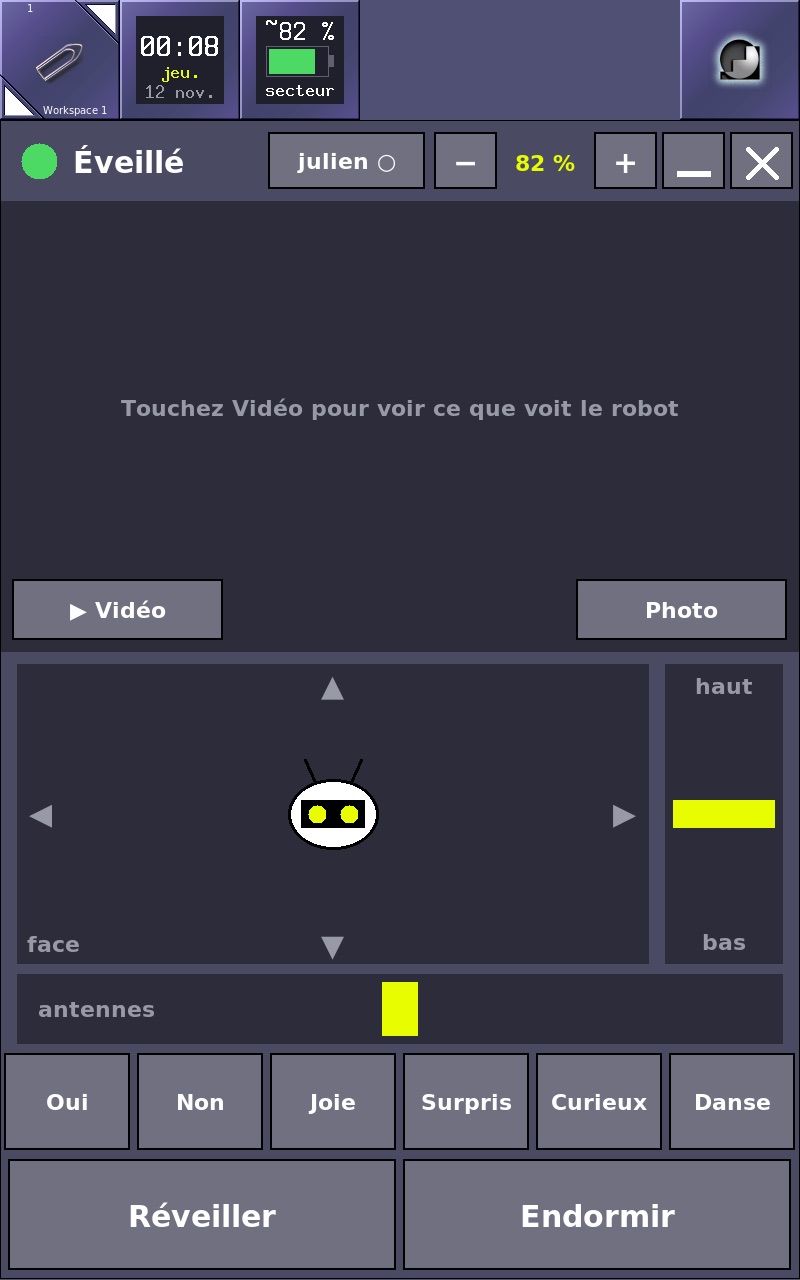
The first pad was a yellow dot on a cross. Things moved, but it wasn’t clear which way. It now shows the robot’s face seen from the front: it goes where the finger goes, and its eyes look that way. A “face” corner recenters it.
Along the way, the window’s title bar went away. It was useless on a phone screen. Minimize and close are two buttons inside the app, and the space saved goes to the image.
From jerks to glide
Second test: the head obeyed, but in jerks. Each position went out as a small separate movement, with a start and a stop, and the next one waited for the previous one to finish.
The phone now sends twenty-five positions per second, as direct targets. Each step covers 30% of the remaining distance, so the head glides toward the finger and slows down as it arrives. The robot answers in 26 milliseconds: plenty of time.
The robot’s view
The robot’s camera streams video meant for browsers, too heavy for this phone to decode. It needed a go-between, a relay, to receive that video and turn it into plain JPEG photos, twelve per second, that the phone shows effortlessly.
First attempt on the computer: it worked, but the computer had to stay on. So the relay moved to a Raspberry Pi 3 that already runs around the clock at home.
The road wasn’t straight. The robot’s kit relies on a video module the Pi’s distribution doesn’t ship. Instead, I wrote a small video client that talks to the robot directly. Decoding and image making go through the Pi’s video chip, not its processor: the load dropped from 164% to 62% (out of 400%). The robot also offers fallback routes over the Internet; the relay turns them down, and the image never leaves the house.
Result: the first image shows up in four seconds, twice as fast as with the computer, and the phone gets fourteen per second. A photo button keeps the image at full resolution.
And now
Until now, my little control console had to stay plugged in to drive the robot. The phone fits in a pocket, runs on battery, and sees what the robot sees.